How much can I spend today?
Green Line Budget is a private budget app for iPhone. It works out what's left this month, what's safe to spend each day, and where the month will end up. No account, no bank login, no internet needed.
01 Where the month ends
See the end of the month before you get there.
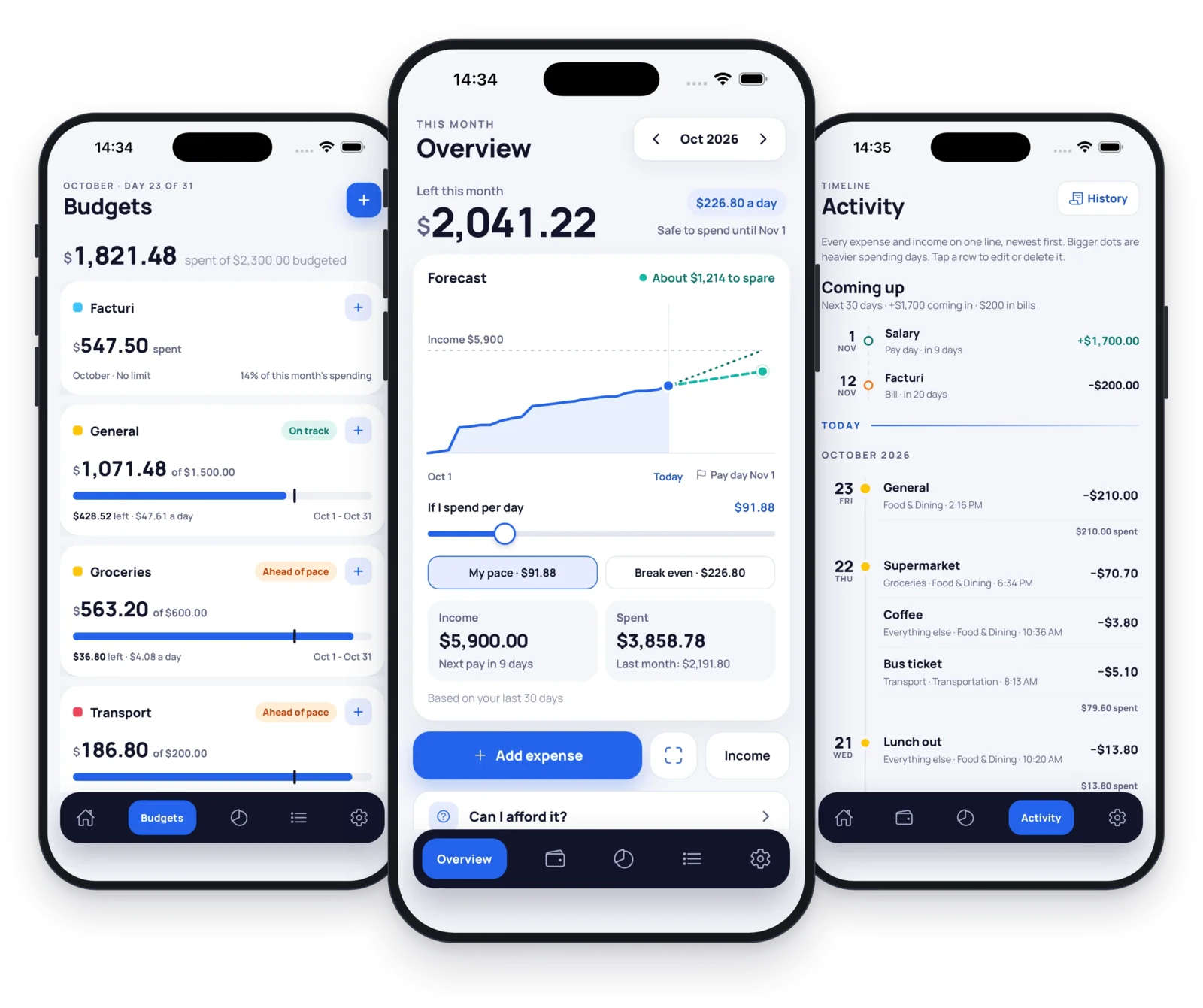
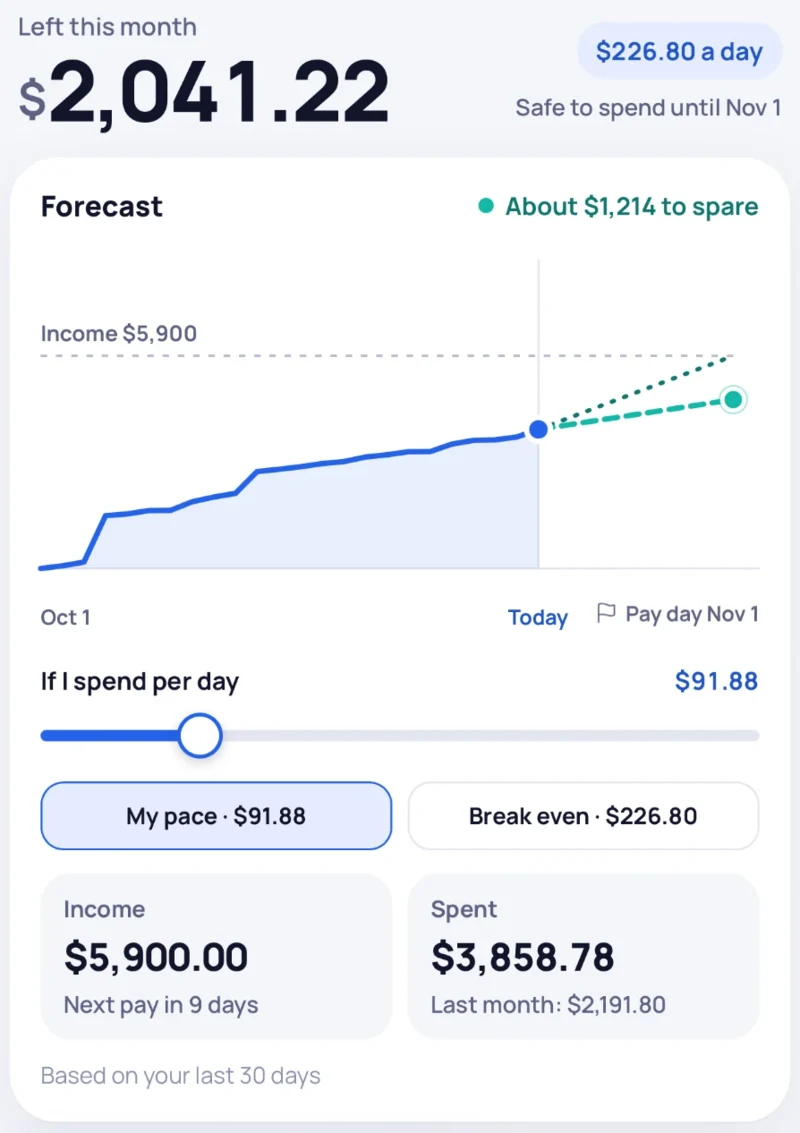
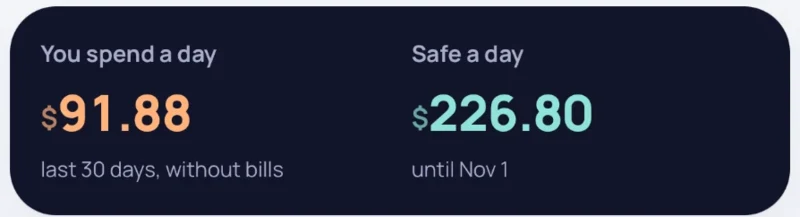
Open the app and the answer is at the top: what's left this month, and what's safe to spend a day until the date next to it. Here that's $226.80 a day.
Underneath, the forecast draws what you've spent so far and carries it forward at your current pace, based on your last 30 days. Slide If I spend per day to try a different amount and watch where the month lands. Break even is the most you can spend a day and still make it to pay day.
02 Budgets
A tick on every bar.
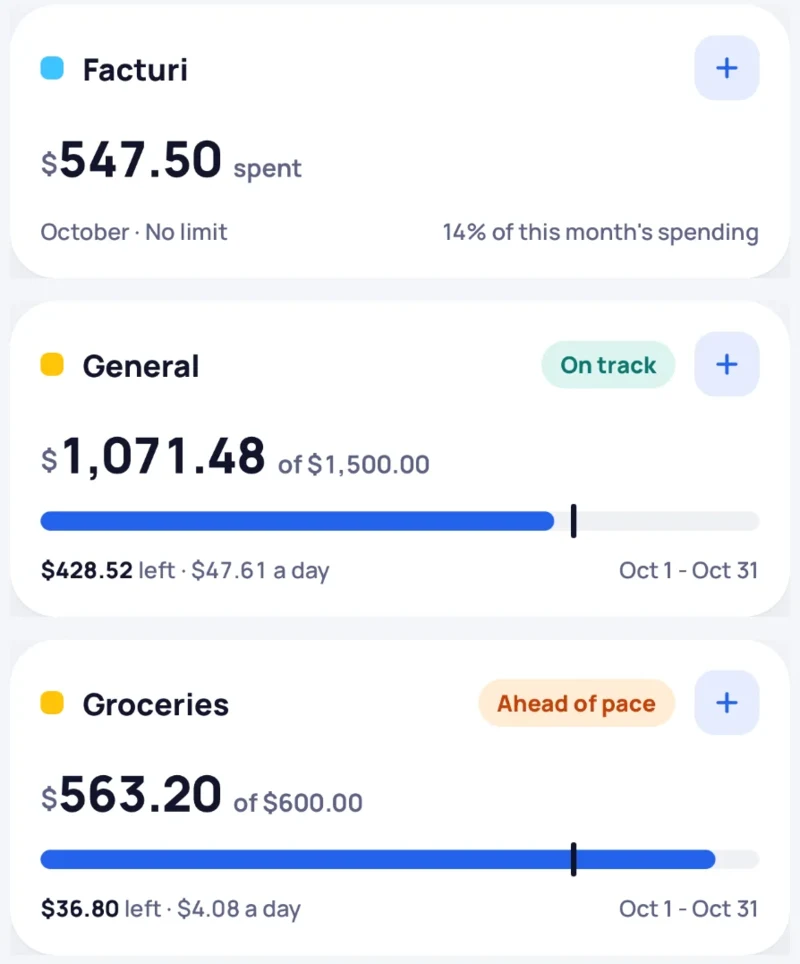
Each budget has a small tick on its bar. That's today's date on the month. Stay short of it and the budget says On track. Pass it and it says Ahead of pace.
Groceries here still has $36.80 left and is already telling you to slow down. Facturi has no limit at all, so it just counts what you spend and shows its share of the month.
03 Can I afford it?
Ask first, then spend.
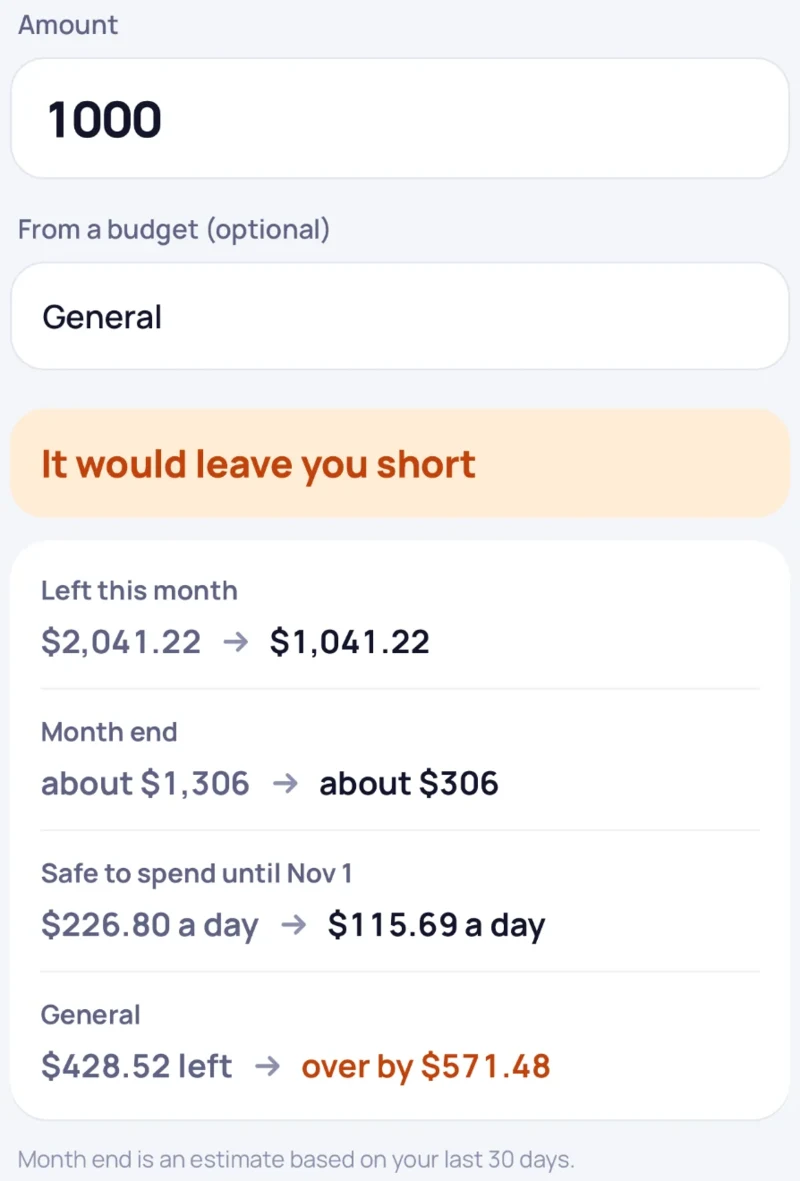
Type an amount, pick a budget if it belongs to one, and see what it would do before anything is saved.
Here, $1,000 from General turns $2,041.22 left into $1,041.22, moves the month end from about $1,306 to about $306, drops the safe amount from $226.80 to $115.69 a day, and puts General over by $571.48. The app's verdict: It would leave you short
Still want it? Add it as an expense from the same screen.
04 Activity
Everything on one line.
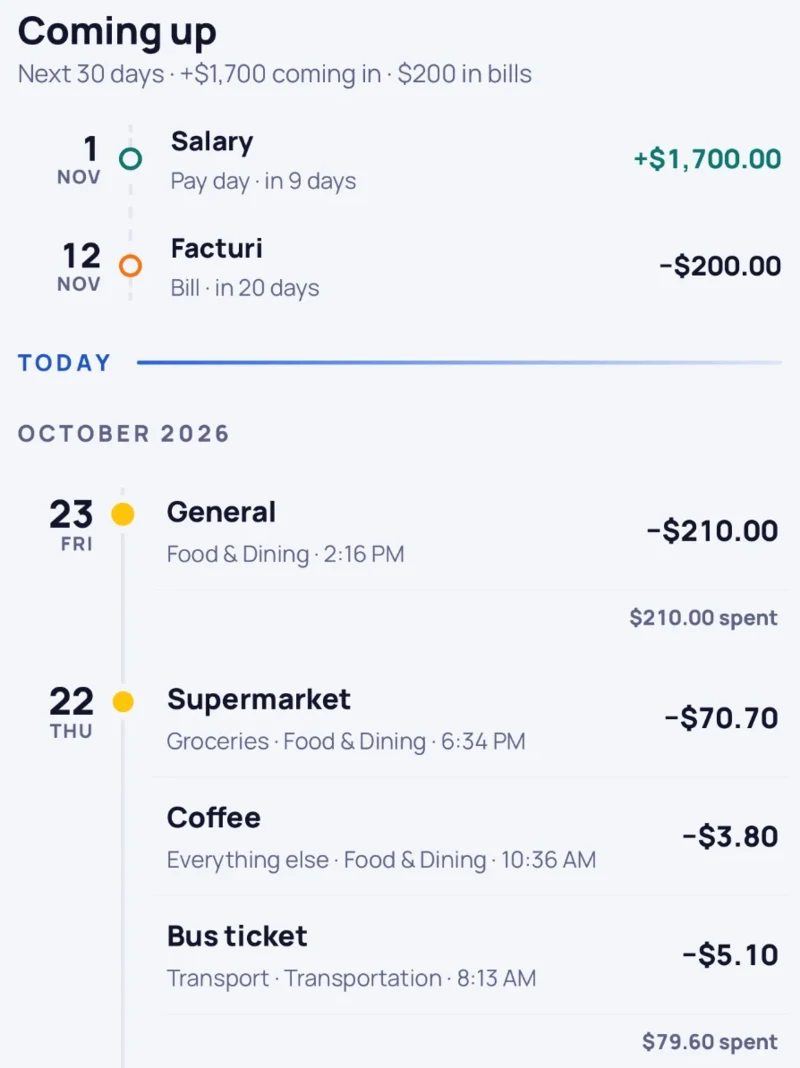
Activity lists every expense and income, newest first. The bigger the dot, the heavier the spending day. Tap a row to edit or delete it.
Above the list, Coming up looks 30 days ahead: here a $1,700 salary on 1 Nov and a $200 Facturi bill on 12 Nov, so nothing arrives as a surprise.
05 Analytics
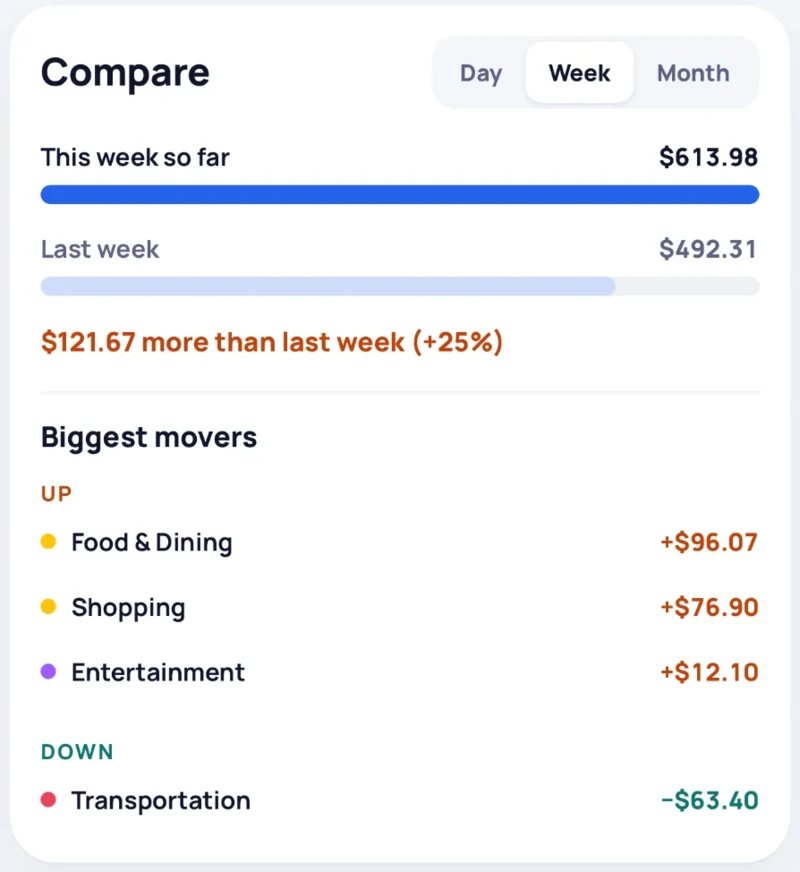
This week against last week.
Compare a day, a week or a month with the one before. The biggest movers show which categories pushed the total: here Food & Dining is up $96.07 and Transportation is down $63.40.
Then there's the comparison that matters most: what you actually spend a day ($91.88, last 30 days, without bills) next to what's safe ($226.80).
06 The fine print
What it doesn't ask for.
Your budget is yours. It lives in a database on your iPhone, and if you delete the app, it goes with it. We don't run a server for your budget, so there's no account to make and nothing to sync.
Green Line Budget
Questions people ask.
Is Green Line Budget a free budget app?
It's free to download from the App Store. Premium is an optional one-time purchase, not a subscription.
Is it really a private budget app?
Yes. Your budgets and transactions are stored in a database on your iPhone and never uploaded. There's no account, no ads, and no tracking or analytics SDKs. If you buy Premium, Apple and RevenueCat handle the purchase itself, and that's the only outside service involved.
Does it work offline?
Yes. Everything runs on your phone, so you can check your budget and add purchases with no internet connection at all.
Do I need an account or to connect my bank?
No to both. You log purchases yourself, which keeps the app simple and means there's nothing to sign up for and nothing to link.
Do I have to set up budgets?
No. You can add expenses with no budget and log income too. Budgets are there for the things you want a limit and a pace on, and a budget can also have no limit at all.
Can I check a purchase before I make it?
Yes. Can I afford it? shows what an amount would do to what's left this month, your estimated month end, your safe daily amount and the budget it would come from, before anything is saved. If you still want it, you can add it as an expense from the same screen.
How is Green Line Budget different from other budget apps?
It opens on your month instead of a transaction list: what's left, what's safe to spend a day, and a forecast of where the month will end. Budgets show a tick for today's date, so you can see whether you're on track or ahead of pace.
What does "safe to spend" mean?
It's what's left this month spread across the days until the date shown next to it. In the sample screen, $2,041.22 over 9 days comes to $226.80 a day.
Can I export my data?
Yes. You can export your transaction history to a CSV file from Settings at any time.